




Common problems with karaoke machines
Note: Blume karaoke machines are all-in-one machines; some models require connection to a TV/speaker/Bluetooth microphone to use.
Blume 5-in-1Simply connect the audio equipment to use it.。
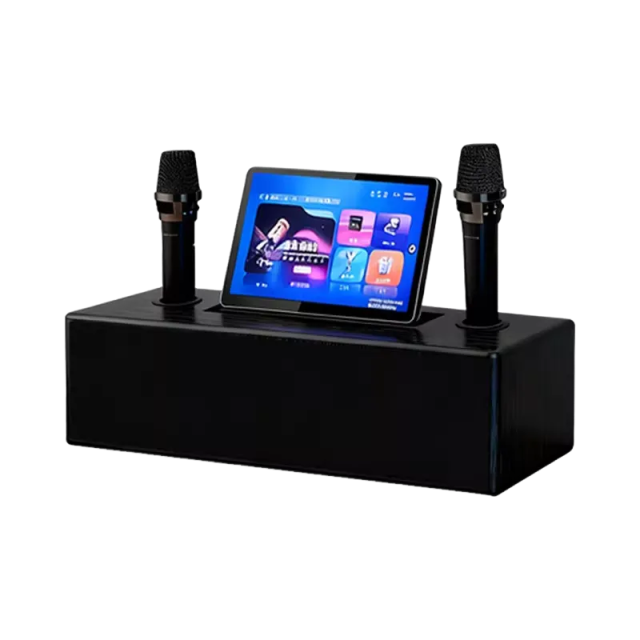
Wireless Touchscreen Karaoke TabletIt can be used by simply connecting a Bluetooth speaker and microphone.
Blume BASS all-in-one karaoke machine with audio systemSimply connect it to the TV.
Blume 6-in-1 MAX Karaoke MachineIt starts playing music as soon as it's turned on.
Installation is very simple. However, there are a few customers who are not very familiar with the installation and connection of these electronic devices. Therefore, we have compiled some common issues that customers may encounter during the installation, operation, and use of our best-selling Blume karaoke machine for your reference.
Attention! The default password for the 5-in-1 karaoke machine is...“123456”。
Regarding the connection of the five-in-one karaoke machine
1.How do I connect to my TV for screen mirroring?
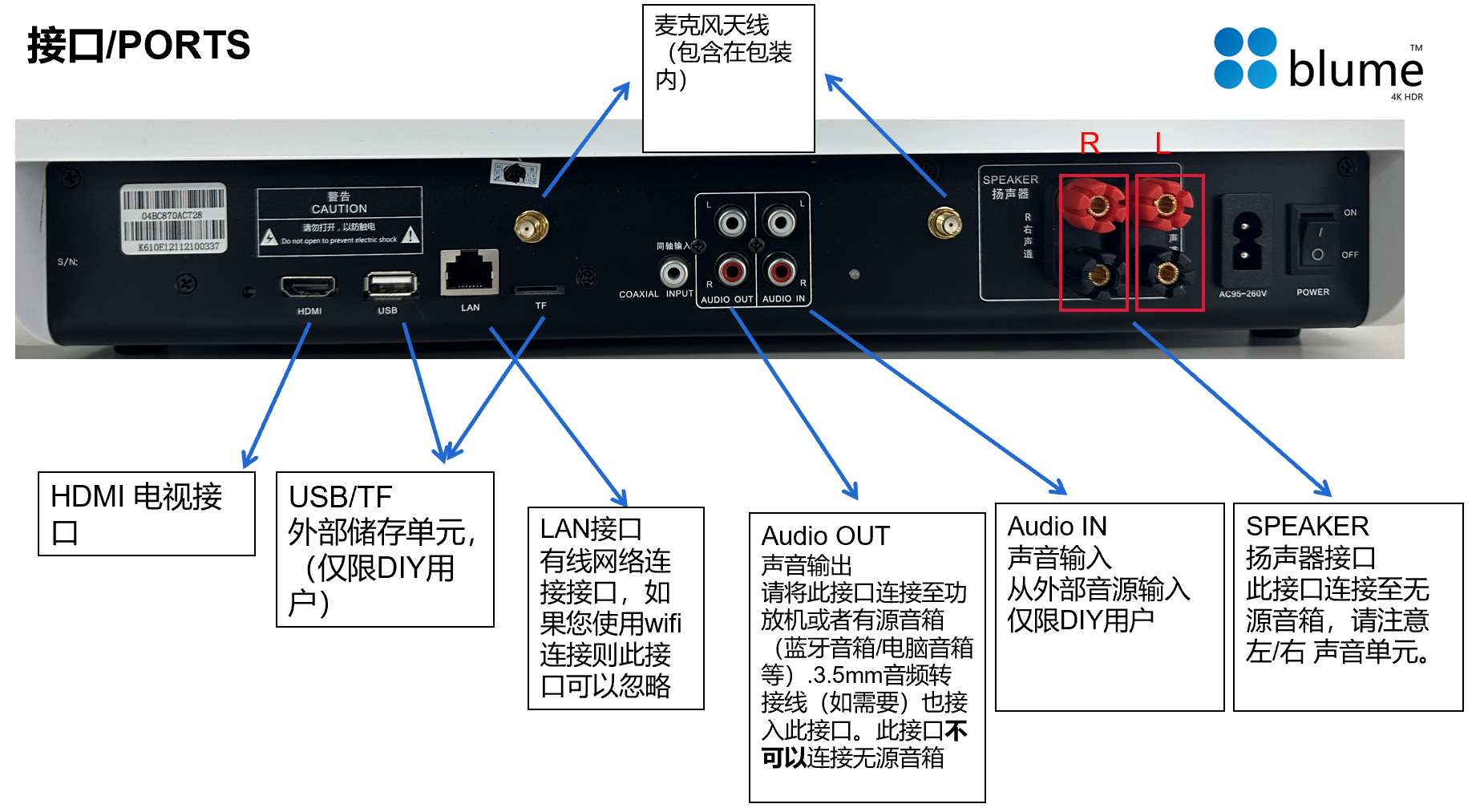
Connect the karaoke machine to a TV via the HDMI port on the back, and the karaoke machine can be projected onto the TV screen.
2.How do I connect audio equipment?
1. Passive speaker;
2. Bluetooth speakers/computer speakers/soundbars with AUX interface;
3. Home theater system (amplifier unit)
The connection instructions will provide detailed connection methods; the connection is very simple!
3.How do I connect a microphone?
Connect the microphone antenna (which can boost the signal) and install the microphone battery. Generally, after turning on the microphone, it will automatically connect. If you have correctly connected the speaker but the microphone still has no sound, you can follow these steps:
(1) Check the microphone volume on the karaoke machine to see if the sound is on.
(2) Ensure that the audio cable connecting the speaker is properly connected.
(3) Re-pair the frequency
① Mute the microphone
② Press and hold the power button and the short button below it—microphone turns on—factory reset restored.
Open the cover under the microphone; there is a reset button. Press the short open key and the round reset button two or three times in succession. When you see the display screen's Frequency flashing, you need to wait until this frequency stops flashing, which indicates that automatic frequency adjustment is complete.
4.How do I connect to the internet?
(1) Connect the network cable directly through the LAN interface.
(2) Click on the "Tools - Settings" in the upper right corner of the karaoke machine screen, go to network settings, connect and configure the options and password for WIFI, and connect to the wireless network.
Other issues
1. You can connect the TV for screen mirroring, but the TV speakers cannot be used as a microphone output; the TV can only be used as a display. The microphone sound can only be transmitted through the AV port to an amplifier or directly to speakers to produce sound. If connected solely to the TV, there will be no sound from the microphone.
The karaoke machine does not require installation; just connect it to the speaker. If you need to cast to a screen, you can connect it to your own TV, as we have an HDMI port. Additionally, our karaoke machine products do not include speakers; we only provide a wireless microphone. Our store also offers speakers at different price points for you to choose from, and you can purchase other speakers as well. Since different customers may have varying requirements for sound quality, we do not sell it bundled with speaker equipment.
3. Blume Blue Rice Karaoke Machine is compatible with most home speakers. Regarding the connection issues mentioned above, as long as the interface can connect, it is fine. If your speaker has an optical plug, you will need an adapter cable, RCA to 3.5mm.
4. We currently do not have a company established in the United States, but our website products are sold to overseas Chinese in the United States, Canada, and other regions. We have a warehouse in the United States, and the main products we promote, the karaoke machines, are shipped from the U.S. warehouse. The logistics are all on dedicated lines, and many Chinese friends in the U.S. have been placing orders on our website for a long time.
5. If our US warehouse is out of stock, we will ship from Hong Kong. We will contact you to confirm before shipping.
6. The machine has a one-year warranty. If there are quality issues with the product itself within one year, please contact us directly for warranty service. After the warranty period, we also have after-sales service available locally in the United States. You can contact us for paid repairs.
7. The music library is updated regularly, weekly and monthly. With a large user base, we update it frequently to maximize user satisfaction.
8. We need 1-3 business days to process the order, then we will inspect and package the machine, and it is expected to be shipped out in 3 business days.
A 9.2TB capacity can store approximately 30,000 songs, a 3TB capacity can store approximately 60,000 songs, and a 4TB capacity can store approximately 100,000 songs.
10. If our music library doesn't have the songs you want, you can download them to a USB drive and then insert the USB drive to add them to the karaoke machine.
11. The 5-in-1 can also be connected to its own amplifier system, such as a home theater system with amplifier functionality.
Regarding orders
1.BlumeLanmi Family KTV by oinked What payment methods are accepted?
Visa, MasterCard, Paypal, American Express, UnionPay, Apple Pay
2.Why haven't I received any notification emails?
If your contact email is filled in correctly, please check your spam folder to see if you have received a notification email. It is recommended to add our email to your contact list to receive relevant notifications in the future.
3.Can I change my address?
If your order has not yet been shipped, you can contact us via email (blumebyoinked@gmail.com)Contact us for modifications.
If your order has already been shipped, we can help you contact the logistics company for modifications, but there may be an additional charge from the logistics company for the address change fee.
4.How do I cancel my order?
If your order has not yet been shipped, you can cancel the unshipped order directly.
If your order has been shipped, you can contact us, and we will assist you in canceling it as much as possible. (Please note: any unnecessary shipping costs incurred will be borne by the buyer.)
5.Are there any missing items in the received goods?
The items you did not receive may have been damaged or encountered other issues while being prepared for your package, which prevented them from being shipped. Before the package is sent out, we will send you a "Out of Stock Notification" email to discuss an appropriate solution with you. If you have not received any "Out of Stock Notification" email, then your order may have been overlooked due to employee negligence. Please contact us promptly to request a refund or a reshipment.
6.What should I do if I receive a package with something damaged?
Your order may have been damaged during transit due to bumps and pressure. Please contact us promptly to request a refund or replacement.
7.I've already placed an order. Can I add any new items?
Once an order has been confirmed, product details cannot be added, deleted, or modified. You need to cancel the order and place a new one.
Regarding mailing
1.What are the mailing methods and duration?
BLUME offers free shipping to 48 states in the US and all of Canada. All BLUME KTV products are shipped and delivered from within the US.
Delivery is via UPS/USPS in the United States. Delivery time is 2-5 days within the US, and may be 7 days for remote areas.
Delivery within Canada will be via Canada Post or UPS. Delivery time within Canada is 2-5 days, and may be 7 days for remote areas.
2.Can the resold order be delivered to a different method?
We apologize, but the delivery method cannot be changed for reissued orders. When we generate a reissue order, the system will automatically match the order with the original delivery method.
3.What should I do if my package is damaged in transit?
Due to logistics reasons, the package may be damaged during transportation. You only need to contact us and provide evidence such as pictures or videos, and we will contact the shipping company for feedback and follow-up, and promptly process a refund or reshipment for you.
Regarding payment
1.Can the refund be returned to a non-payment account?
All refunds will be returned only to the payment method you used when placing your order. We apologize that we cannot provide a refund to any account other than the one used for the original payment.
2.Why does my order keep showing as a payment failure?
If your payment fails, please try the following:
(1) When making payment, save your bank card information before placing the order / or delete the saved bank card information and then add it again.
(2) Ensure that the payment information you fill in is consistent with the information you have reserved with the bank, and fill in all information, such as contact email and telephone number.
(3) If you still cannot make a payment after following the above steps, please contact your card issuer for further information.
About the product
1.Will the goods be restocked if they are sold out?
The restocking time for goods varies from 2 weeks to one month. If the goods are sold out during the peak season, the restocking time will be delayed.
2.How can I check the expiration date of a product?
Due to different merchants, the dates printed on the products may be production dates, expiration dates, or even have different date formats (for example: day/month/year, or month/day/year, or year/month/day, etc.), which may cause misunderstandings. Please check the explanation of the date on each product, or contact us, and we will further assist you with your inquiry.
Want to know more? Feel free to contact us!
Frequently asked questions about karaoke machines
Description: The Blume karaoke machine is an all-in-one machine, a five-in-one machine that only needs to be connected to audio equipment to use. Installation is very simple. However, there are also cases where a small number of customers are not familiar with the installation and connection of these electronic devices. Therefore, for our popular and best-selling Blume karaoke machine, we have compiled some problems that customers may encounter during installation, operation, and use for your reference.
Notice! The default password for the machine is "123456".
About Connection
1. How to connect to TV for screen mirroring?
Connect the TV to the HDMI TV interface on the back of the karaoke machine, and the karaoke machine can project the screen to the TV.
2. How to connect audio equipment?
1. Passive speakers;
2. Bluetooth speakers/computer speakers/soundbar with AUX interface;
3. Home theater system (power amplifier unit)
The connection manual will have specific connection methods, and the connection is very simple!
3. How to connect the microphone?
Connect the microphone antenna (which can boost the signal) and install the microphone battery. Under normal circumstances, after turning on the microphone, it will automatically connect. If you have connected the speakers correctly, there is still no sound from the microphone. Follow these steps:
(1) Check the microphone volume on the karaoke machine to see if the sound is turned on
(2) Make sure the audio cable connecting the speaker is well-connected
(3) Re-bind the frequency
①Turn off the microphone
Long press the switch and the short key below - the microphone is turned on - the factory settings have been restored
Open the cover under the microphone. There is a reset button. Short the on/off button and dot reset button two or three times in a row. If you see Frequency flashing on the display, you need to wait until the frequency stops jumping, which means automatic frequency adjustment is completed.
4. How to connect to the Internet?
(1) Directly connect the network cable through the LAN interface.
(2) Click "Tools-Settings" in the upper right corner of the karaoke machine screen, enter network settings, connect and configure WIFI options and passwords, and connect to the wireless network.
Other Questions
1. You can connect to a TV to project the screen, but the TV speakers cannot be used as external microphones, and the TV can only be used as a display screen. The sound from the microphone can only be heard when connected to a power amplifier through the AV port or directly connected to a stereo. If connected to a TV alone, there will be no sound from the microphone.
2. The karaoke machine does not need to be installed, just connect it directly to the speaker. If you need to cast the screen, you can connect your TV, we have an HDMI interface. In addition, our karaoke machine products do not include speakers, only wireless microphones. Our store also has speakers at different price points to choose from, and you can also choose other speakers. Because different customers may have different requirements for sound quality, we do not directly sell them with audio equipment.
3. The Blume karaoke machine can be adapted to most household speakers. Compared with the connection issues of audio equipment mentioned above, as long as the interface can be connected, it will be fine. If your speaker has an optical plug, you will need an adapter cable, RCA to 3.5mm.
4. We currently do not have a company in the United States, but the products on our website are sold to overseas Chinese in the United States, Canada, and other countries. We have warehouses in the United States, and the karaoke machines we recommend are all shipped from the warehouse in the United States. The logistics are dedicated lines. Many Chinese American friends have placed long-term orders on our website.
5. If the US warehouse is out of stock, we will ship from Hong Kong. We will communicate with you for confirmation before shipping.
6. The machine has a year warranty. Within one year, if the product itself has quality problems, please contact us directly for warranty. After the warranty period, we also have after-sales service in the United States. You can contact us for paid repairs.
7. The music library will be updated regularly every week and every month. There are many users, so we will update frequently to maximize user needs.
8. We need 1-3 working days to process the order, and then the machine will be inspected and packaged. It is expected to be shipped in 3 working days.
The 9.2T capacity can store approximately 30,000 songs, the 3T capacity can store approximately 60,000 songs, and the 4T capacity can store approximately 100,000 songs.
10. If our music library does not have the songs you want, you can download them to the USB flash drive, and then insert the USB flash drive to add to the karaoke machine.
11. The five-in-one can also be connected to your power amplifier system, such as a home theater system with a power amplifier function.
About Order
1. What payment methods does Blume Lanmi Family KTV by oinked accept?
Visa, MasterCard, Paypal, American Express, UnionPay, Apple Pay
2. Why didn’t I receive any notification email?
If your contact email is filled in correctly, please check your spam box to see if you have received a notification email. It is recommended to add our email to your contact list so that you can receive relevant notifications in the future.
3. Can I change my address?
If your order has not been shipped yet, you can contact us via email (blumebyoinked@gmail.com) to make modifications.
If your order has been sent, we can help you contact the logistics company to make changes, but the logistics company may charge you an additional fee - address modification fee.
4. How to cancel the order?
If your order has not been shipped, you can cancel the unshipped order directly.
If your order has been shipped, you can contact us and we will assist you with cancellation if possible. (Please note: Unnecessary freight expenses incurred must be borne by the buyer.)
5. Are there any missing items in the goods received?
The goods you have not received may be damaged or otherwise unavailable when the package is actually prepared for you. Before the package is shipped, we will send you an "Out of Stock Notification" email to discuss with you the appropriate handling method. If you do not receive any "out of stock notification" email, then your order may have been missed due to employee negligence. Please contact us in time to apply for a refund or reissue.
6. What should I do if something is damaged in the package I receive?
It may be that the goods you ordered were damaged due to bumps and squeezing during transportation. Please contact us promptly to apply for a refund or reissue.
7. I have placed an order, can I still add new products?
Confirmed orders cannot add/delete/modify product content. You need to cancel the delivery order and place a new order.
About Mailing
1. Mailing method and length?
Free shipping to all 48 states in the United States and Canada. BLUME KTV all ships from the United States.
Delivered by UPS/USPS in the United States. 2-5 days within the United States, and possibly 7 days in remote areas.
Delivery within Canada will be via Canada Post or UPS. 2-5 days within Canada, and possibly 7 days in remote areas.
2. Can the delivery method be changed for reissued orders?
We are very sorry that the delivery method cannot be changed for reissue orders. When we generate a reissue order, the system will automatically match the order according to the original delivery method.
3. What should I do if my package is damaged during transportation?
Due to logistics reasons, the package may be damaged during transportation. You only need to contact us and provide proof of the situation with pictures, videos, etc., and we will contact the mailing company to provide feedback and follow up and provide you with a refund or reissue in a timely manner.
About payment
1. Can the refund be returned to a non-paying account?
All refunds will only be made to the method of payment used when placing the order. We regret that we are unable to provide refunds of actual amounts to any account other than your then-current payment account.
2. Why does my order keep showing payment failed?
If your payment fails, please try the following solutions:
(1) When paying, save your bank card information and place an order/or delete the saved bank card information and add it again.
(2) Make sure that the payment information you fill in is consistent with the information reserved in the bank, and fill in all information, such as contact email, phone number, etc.
(3) If you follow the above methods and still cannot pay, please contact your card issuing bank for further inquiries.
About the product
1. Will the product be replenished when it is sold out?
The replenishment time of the product ranges from 2 weeks to a month. If the supplier is out of stock, the replenishment time will be delayed.
2. How to check the shelf life of the product?
Due to different merchants, some of the dates printed on the products are the production date, some are the expiration date, and some merchants even have different date formats (for example day/month/year, or month/day/year, or year/month/day, etc. etc.) may cause you to misunderstand. Please check the explanation of the date on each product, or contact us and we will make further inquiries for you.
Want to know more? You can contact us directly!

.png?w=2000&h=2000)
.png?w=2000&h=2000)
-.png?w=2000&h=2000)
-.png?w=2000&h=2000)


 、
、