2026 Blume Home Karaoke Tutorial | Created by World's Top 500 Acoustics Engineers
Nov 04,2025 | CV Mango
Blume Home Karaoke Complete Tutorial (2025) | Created by World's Top 500 Acoustics Engineers
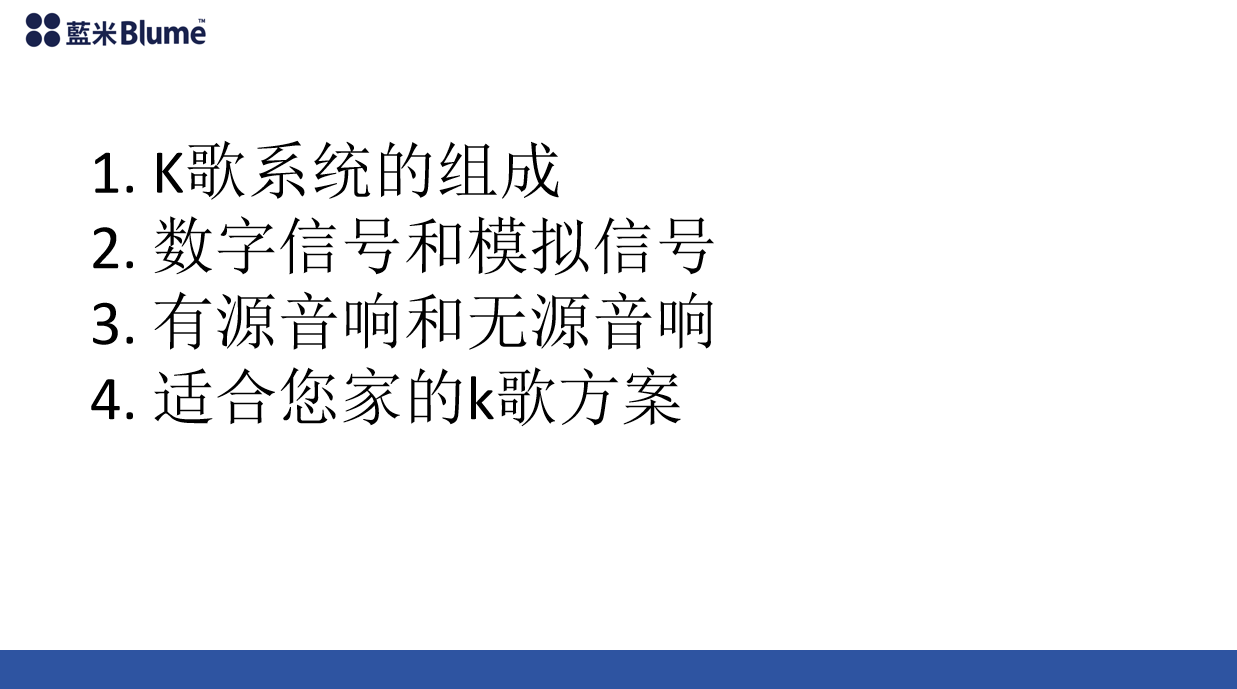
1. Components of a Karaoke System
2. Digital signals and analog signals
3. Active and passive speakers
4. A karaoke plan suitable for your home
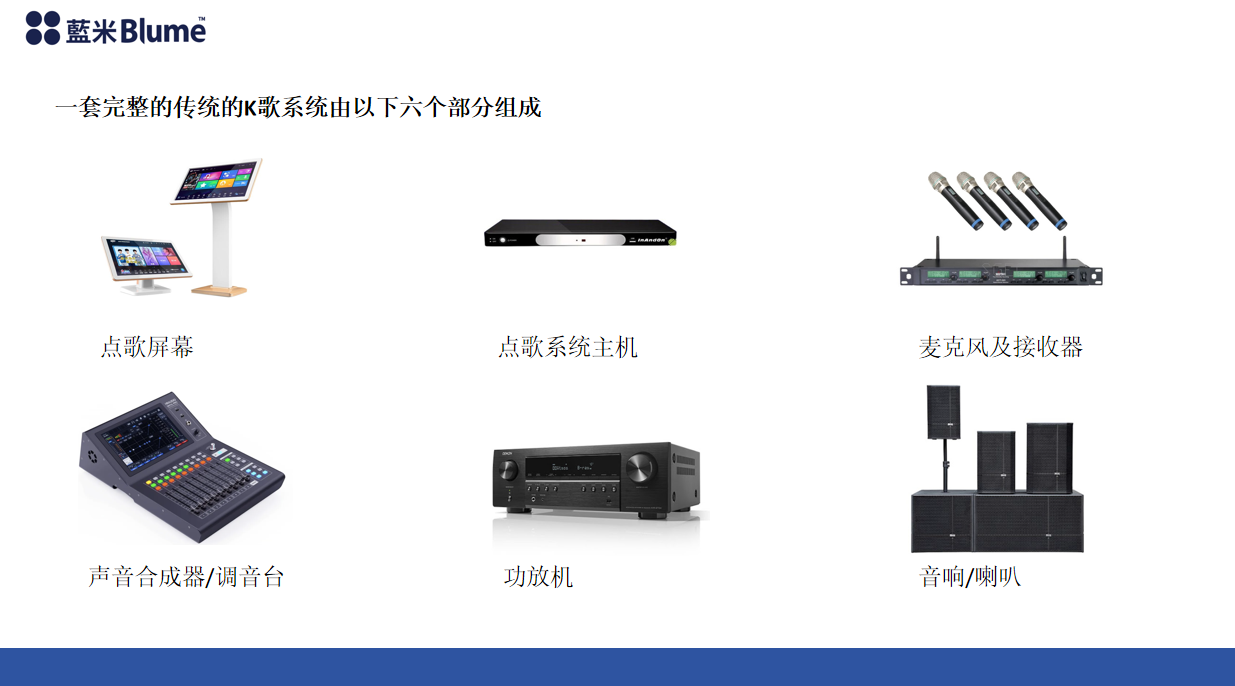
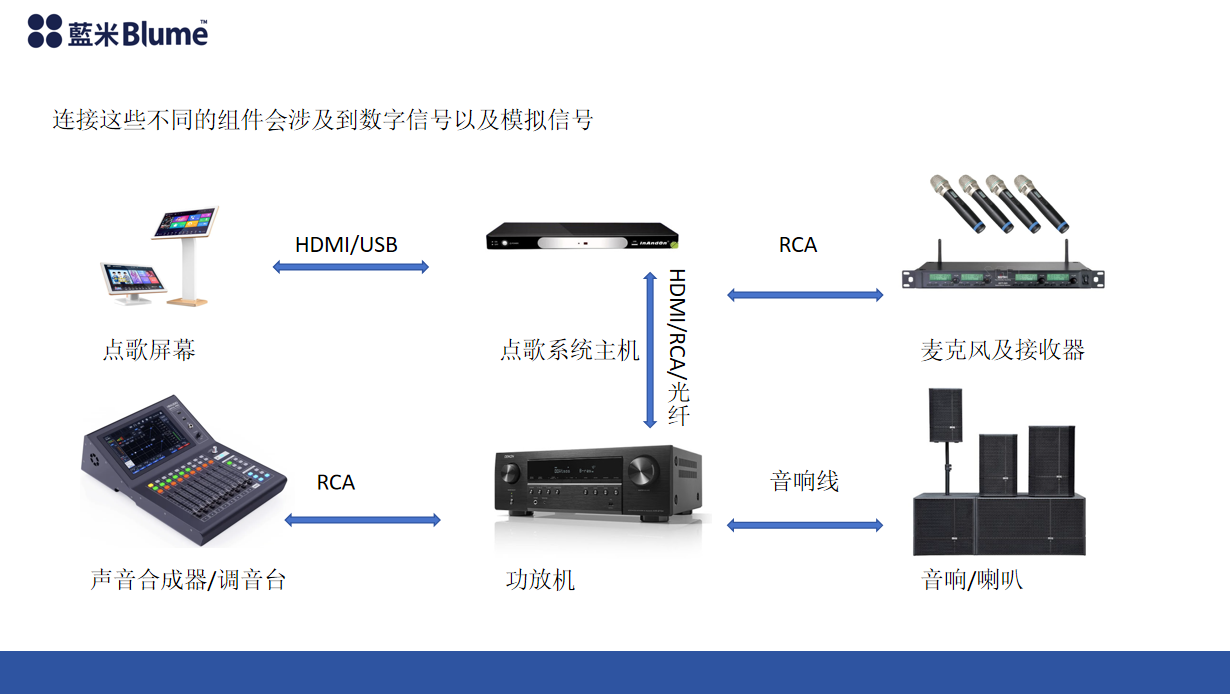
A complete traditionalKThe song system consists of the following six parts.
1. Song selection screen 2. Song selection system host 3. Microphone and receiver 4. Sound synthesizer/mixer 5. Amplifier 6. Speakers (Connecting these different components will involve digital signals as well as analog signals)
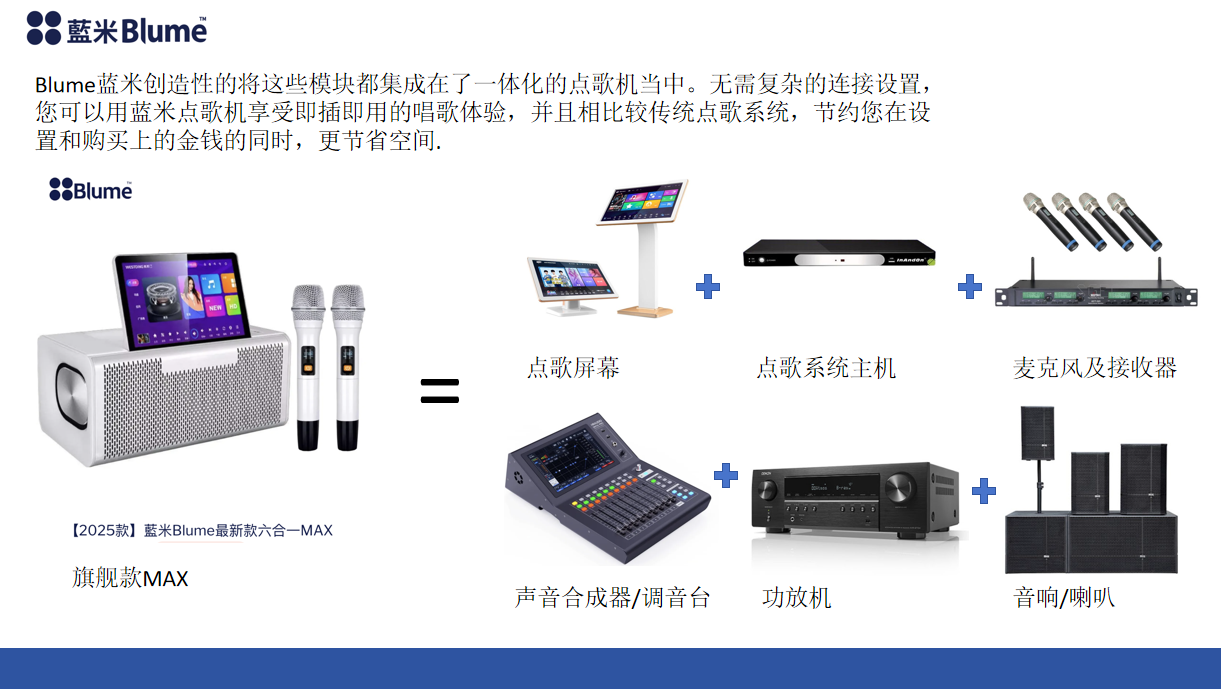
Blume creatively integrates these modules into an all-in-one karaoke machine. With no complicated connection setup required, you can enjoy a plug-and-play singing experience with the Blume karaoke machine, saving you money on setup and purchases compared to traditional karaoke systems, while also saving space. High-end six-in-one MAX = karaoke screen + karaoke system host + microphone and receiver + sound synthesizer/mixer + amplifier + speaker.
A complete traditional karaoke system consists of the following six parts. The situation may vary for different households; some families may already have part of the system, such as an amplifier and speakers.
🧩 I. System Overview
The core system consists of the following six major modules, each of which can operate independently and work collaboratively to complete the entire process from song selection → voice input → sound processing → audio output.
1️⃣ Song selection screen (Touch Display)
- definitionThe touch-screen karaoke terminal is the user interface.
- Function:
- Browse and search songs (by artist, pinyin, category, language, etc.)
- Supports QR code song selection (WeChat/APP)
- Displays music video footage, lyrics, and playback status.
- signal type: Only processDigital signals(Communicates with the host via HDMI/USB)
- AI-assisted responses to common questions:
- Screen unresponsive → Bootstrap to check power and data cable connections.
- Unable to select a song → Check network connection with the host.
- Screen lag → We recommend restarting the system or clearing the cache.
2️⃣ Karaoke System Box (Main Host)
- definitionThe system's brain, integratingOperating system, karaoke software, music library and network functions。
- Function:
- Run the Blume karaoke system APP
- Store and manage the song database (updated regularly in the cloud).
- Output video signal to display device (TV/monitor).
- Receives microphone audio signals (via a mixing console or wireless receiver).
- signal type:
- Output: Digital video signal (HDMI)
- Input: Audio signal (via tuner or USB sound card)
- AI-assisted responses to common questions:
- "System prompts that it cannot connect to the network" → Check WiFi settings or router signal.
- "The karaoke app cannot be opened" → Instructions include restarting or updating the firmware.
- "Song playback is lagging" → We suggest switching networks or using offline mode.
3️⃣ Microphones & Receiver
- definitionVoice input device used to collect users' singing voices.
- Function:
- Convert soundAnalog audio signalSend to receiver
- The receiver transmits the signal to the mixing console or system host.
- Supports duet/multi-person singing modes (multi-channel input).
- signal type:
- Microphone → Analog Signal
- Receiver output → Analog or digital signal (depending on model)
- AI-assisted responses to common questions:
- "No sound" → Check the microphone and receiver pairing status or the battery.
- "Noise/whistling" → Adjust the volume or distance, and check for the source of interference.
- "High latency" → Check the connection channel and it is recommended to use low latency mode.
4️⃣ Audio Mixer / Sound Processor
- definitionAudio signal processing and mixing center.
- Function:
- Mix the microphone signal with the background music.
- Enhance sound effects (such as echo, reverb, and noise reduction).
- Output a unified audio signal to the power amplifier
- signal type:
- Input: Analog signal (from microphone receiver, host computer)
- Output: Analog signal (to power amplifier)
- AI-assisted responses to common questions:
- "Voice too low" → Check channel volume and microphone gain.
- "No sound in the accompaniment" → Check the background sound input channel.
- “Sound distortion” → Check for overload or excessively high output level.
5️⃣ Power Amplifier
- definition: Responsible for amplifying audio signals, enhancing weak audio signals to drive speakers.
- Function:
- Receive the output signal from the mixing console
- Amplified to drive the speakers
- Some models have built-in Bluetooth or digital input modules.
- signal type:
- Input: Analog signal
- Output: Power signal (drives the horn)
- AI-assisted responses to common questions:
- "Power on but no sound" → Check the input channel or volume.
- "Volume fluctuates" → Check the stability of the audio source or contact issues.
- “Overheating or automatic power-off” → Check the heat dissipation and load matching.
6️⃣ Speakers
- definitionThe final audio output device.
- Function:
- Convert the amplified electrical signal into sound waves.
- Output the final blend of vocals and accompaniment.
- signal typePower signal (driven by power amplifier)
- AI-assisted responses to common questions:
- "No sound on one side" → Check the left and right channel cables.
- “Cracking sound” → Check if the amplifier volume is overloaded.
- "Noticeable background noise" → Check for grounding interference or amplifier quality.
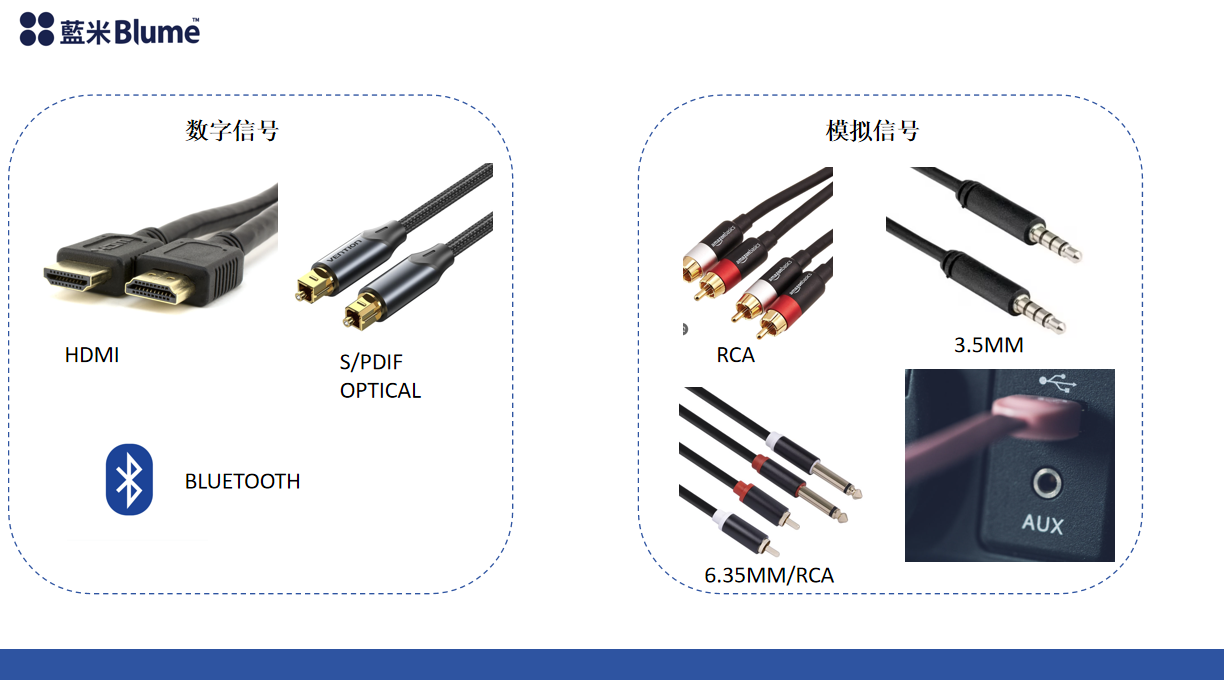
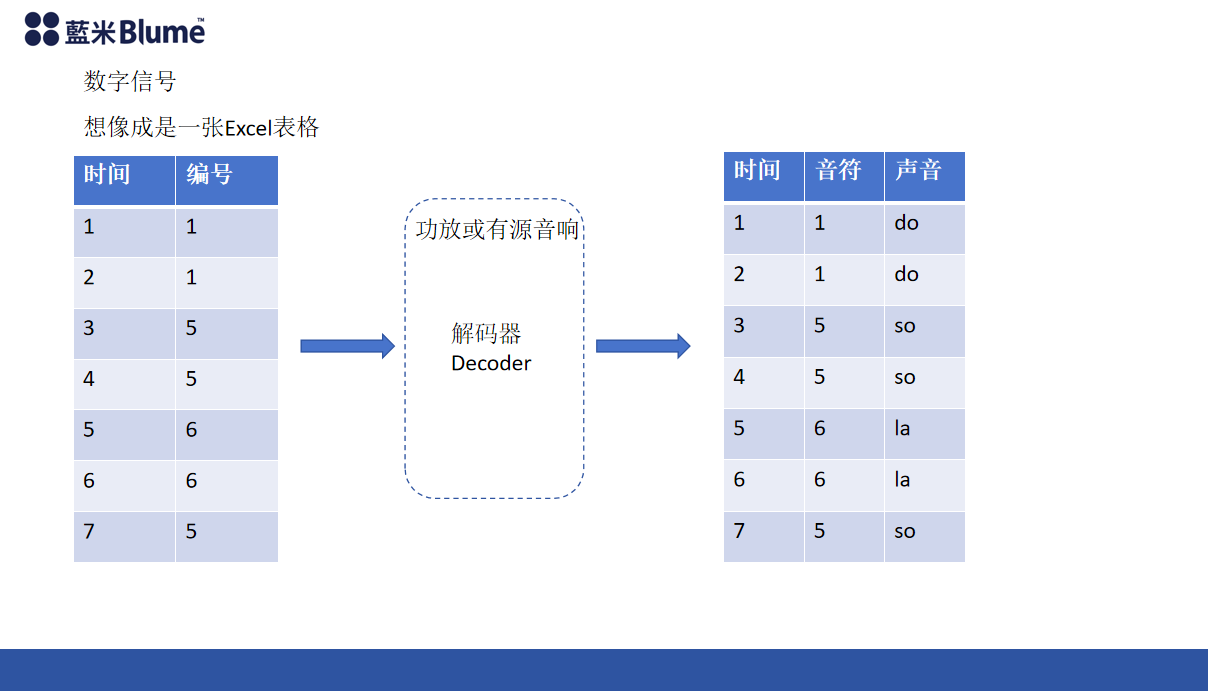
Digital signals
💡 Digital Signals vs. Analog Signals
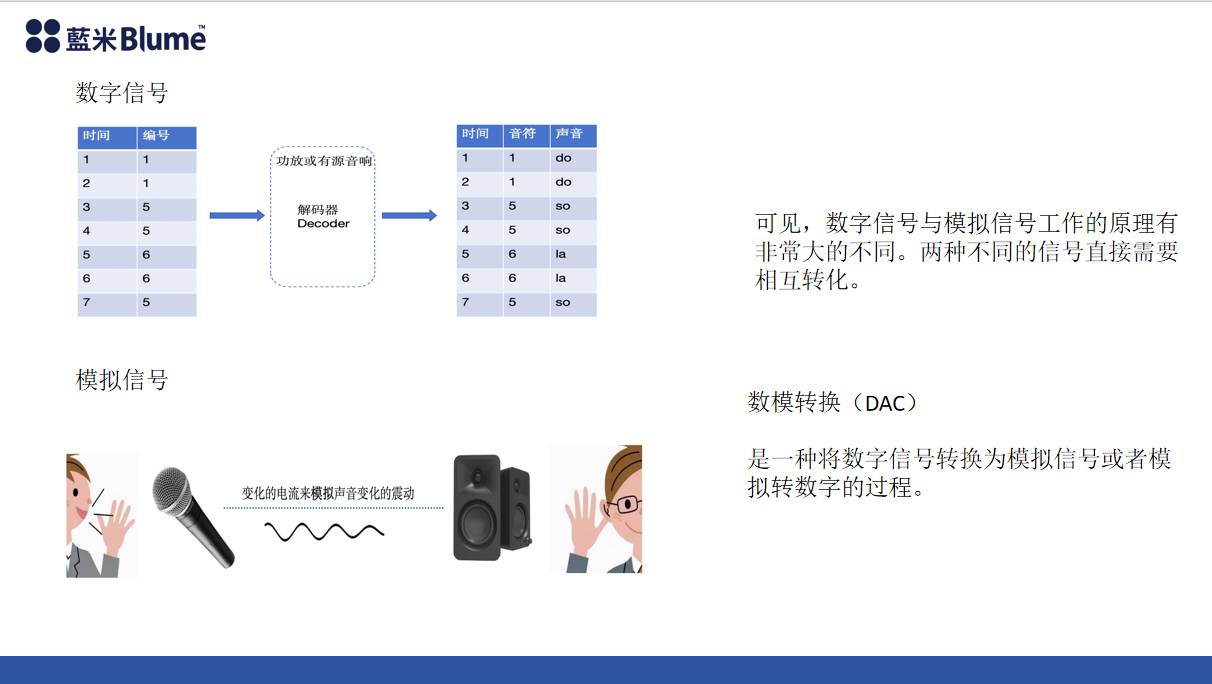
Digital signalsandanalog signalThe working principles are fundamentally different.
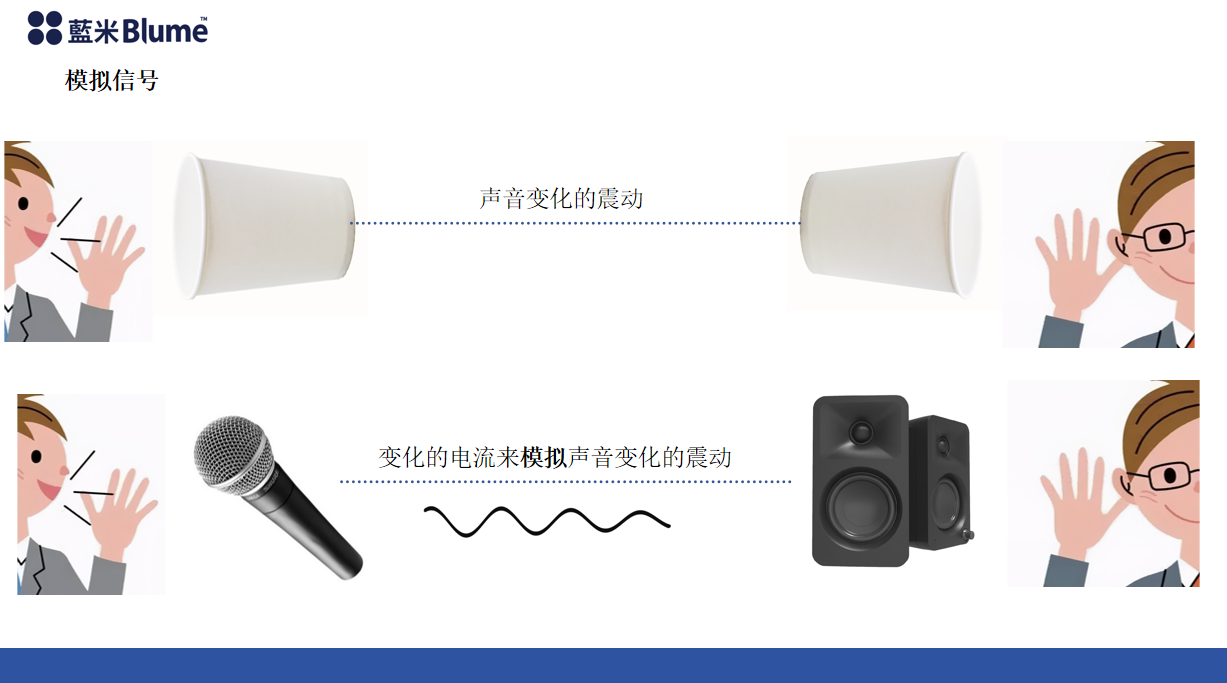
- analog signal(Analog signal) is a continuously changing voltage or current used to represent continuous waveform information such as sound and light in nature.
- Digital signalsDigital Signal transmits information in binary form (0 and 1), representing the original analog waveform through sampling and encoding.
Because the two signals are represented in different ways, they are in the systemIncompatibleIt needs to go throughSignal conversion processTo achieve compatibility:
🔁 Signal conversion principle:
- Analog-to-digital conversion (A/D conversion)
Analog signals (such as sound picked up by a microphone) are converted into digital signals so that they can be processed by a computer or host computer.
For example: Microphone → Sound Card → Digital Signal → Karaoke Host - Digital-to-analog conversion (D/A Conversion)
The digital signal processed by the host or sound card is converted back into an analog signal for playback output by the power amplifier and speakers.
For example: Head unit output → Mixer → Power amplifier → Speakers
⚙️ Technical significance:
- Digital signalsAdvantages: Strong anti-interference ability, easy to store and transmit (such as HDMI, USB, WiFi).
- analog signalAdvantages: Natural sound quality, lower latency, suitable for real-time sound playback (such as microphone input and amplifier output).
Therefore, a complete home karaoke system typically adopts "Digital signal control + analog signal outputA hybrid architecture.
Right now:
Digital signals are transmitted between the host and the display screen.
Analog signals are transmitted between the microphone and the speaker.
By connecting the two via an A/D and D/A converter, high-fidelity sound and system compatibility can be achieved.
analog signal
Digital-to-analog converter (DAC)
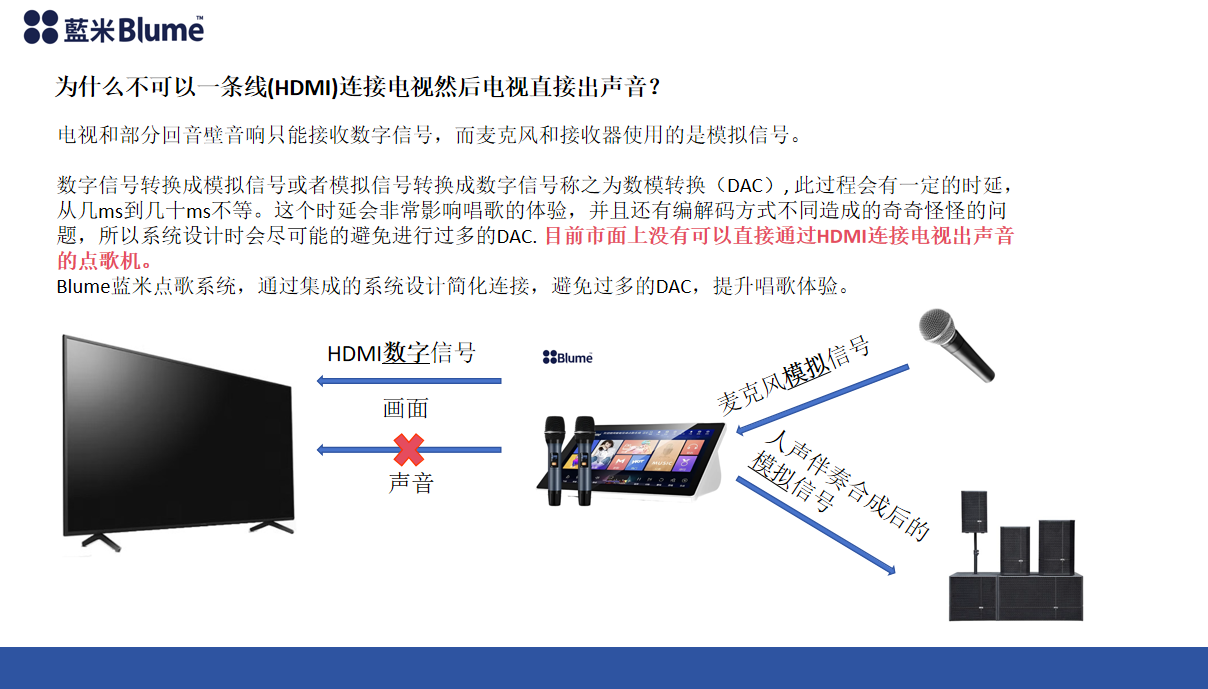
Why can't it be a line?(HDMI)Connect to a TV and then the TV will output sound directly?
Televisions and some soundbars can only receive digital signals, while microphones and receivers use analog signals.
The conversion of digital signals to analog signals or analog signals to digital signals is called Digital-to-Analog Conversion (DAC). This process has a certain delay, ranging from a few milliseconds to several tens of milliseconds. This delay can significantly affect the singing experience, and there are also various strange issues caused by different encoding and decoding methods. Therefore, system design will try to avoid excessive DAC as much as possible. Currently, there are no products on the market that can directly throughHDMIA karaoke machine that connects to a TV and produces sound.
The Blume karaoke system simplifies connections through an integrated system design, avoids excessive DACs, and enhances the singing experience.
The conversion of digital signals to analog signals or analog signals to digital signals is called Digital-to-Analog Conversion (DAC). This process has a certain delay, ranging from a few milliseconds to several tens of milliseconds. This delay can significantly affect the singing experience, and there are also strange issues caused by different encoding and decoding methods. Therefore, system design will try to avoid excessive DAC as much as possible. Currently, there are no products on the market that can directly achieve this.HDMIA karaoke machine that connects to a TV and produces sound.
The Blume karaoke system simplifies connections through an integrated system design, avoids excessive DACs, and enhances the singing experience.
Comment