How to build a high-quality home karaoke system in the United States for under $1000
Jun 10,2026 | Blume
1. Why build a home karaoke system?
In other words, what are the benefits of having a karaoke system at home?
- freeSing anytime, anywhere
- economyOne-time investment, long-term free access
- social contactIt can liven up a gathering of friends.
- studyChildren can learn Chinese through singing.
- Show offPractice singing at home and then amaze everyone at the karaoke bar.
- have no choiceKTVs aren't available everywhere in the US.
2. The essence of a karaoke system and its corresponding development direction:
Let's take a look at the basic functions that a KTV karaoke system should have:
- First, it allows you to select the song you want to sing on the karaoke device;
- Secondly, it can display images and lyrics that match the song on the screen;
- Third, it can play the accompaniment of a song and your singing in the speaker.
It's actually quite simple, isn't it? The essence of the karaoke system is just these three points, and we don't need any more than that. From these three points, we will make selections and purchases in three areas (song selection, video, audio), gradually building a karaoke system with sound quality that can rival that of a KTV private room.
3. Features and list of the home karaoke system we will be building:
The features of the home karaoke system we are going to build are:
- First, make full use of existing household devices (mobile phones and televisions);
- Second, the connection is simple (detailed connection diagrams will be provided);
- Third, it has professional sound effects (confirmed by a friend who has participated in a domestic singing competition).
The song selection system is equivalent to the karaoke machine in a KTV private room. Simply put, its function is to search for and call up song videos, and play them on our video and audio devices.
3-1. Recommended equipment and prices for entry-level karaoke systems:
- Smart TVs and mobile phonesI already have one at home, and it comes with an audio cable.
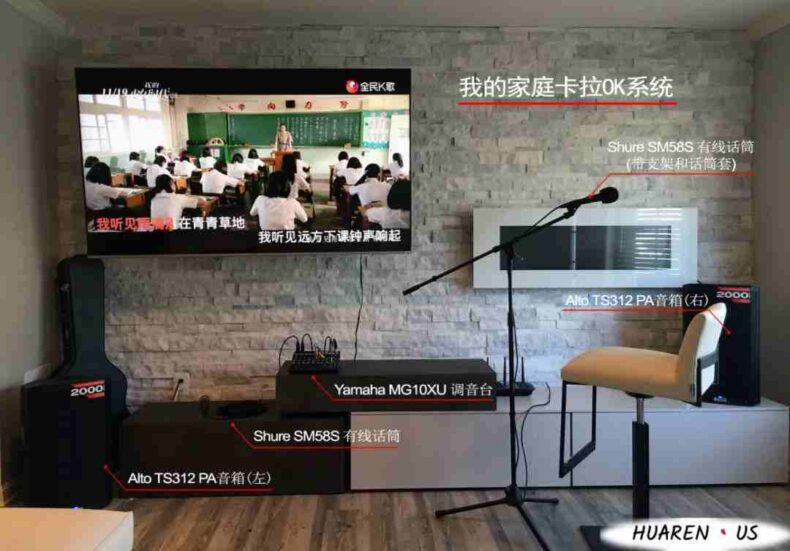
- Two wired microphones:Shure SM58S, $104×2
- A pair of PA speakersAlto TS312, $249.99 x 2; for those who like the JBL brand, you can choose the JBL EON 612, $329 x 2 (Note: both are out of stock; the Alto TS series has been upgraded from the old model 3xx to the new model 4xx, with a similar price being the 10″ TS410).$299.00 at AmazonThe upgraded version of the JBL EON 612 is the EON 712.$569.00 at Amazon)
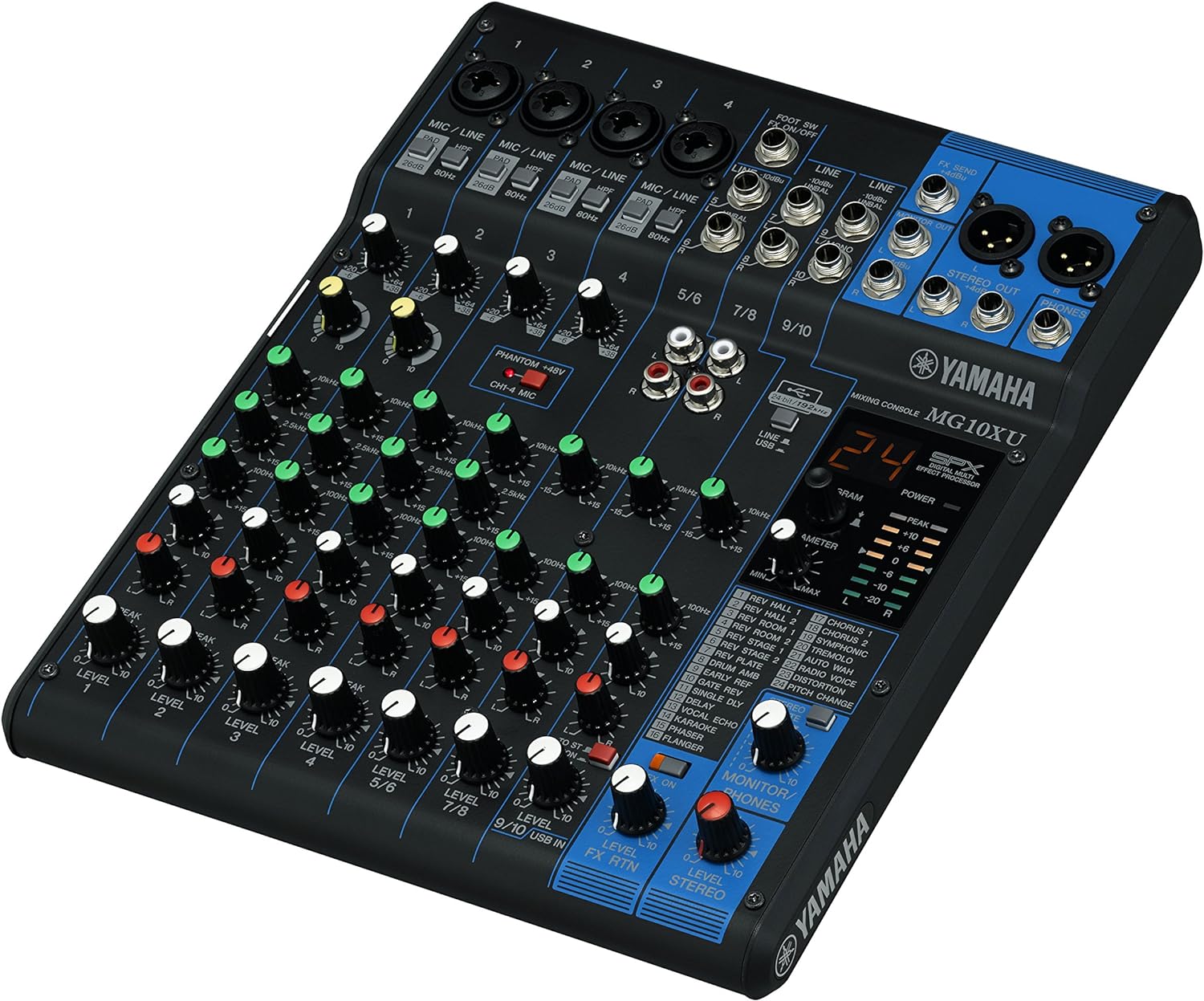
- One mixing console:Yamaha MG10XU,$210
- Four wires:Livewire EssentialThe total price for the four items is around $100.
Total: $918 (equipment excluding wires) + $100 (wires) = $1018 (an additional $158 if JBL speakers are selected).
Yes, you read that right, a budget just over $1000 is enough! And there is absolutely no compromise on quality; the microphone, speakers, and mixing console are all from well-known brands, with sound quality comparable to that of KTV private rooms. For the average person, it can easily serve as a home theater and is completely acceptable as a high-fidelity audio system. Of course, if you are a Hi-Fi enthusiast, then forget I said anything; this is aimed at ordinary people who have normal hearing and a relatively high demand for sound quality, but not to the level of being an audiophile. I believe that at least for a karaoke system, the equipment you can purchase with a budget just over $1000 is already suitable for performances. Below is a real-life photo.
3-2. Equipment and prices for future upgrades to the karaoke system:
The main changes involved upgrading the wired microphones to wireless microphones and the PA speakers to Bose.
- Smart TVs and mobile phonesI already have one at home, and it comes with an audio cable.
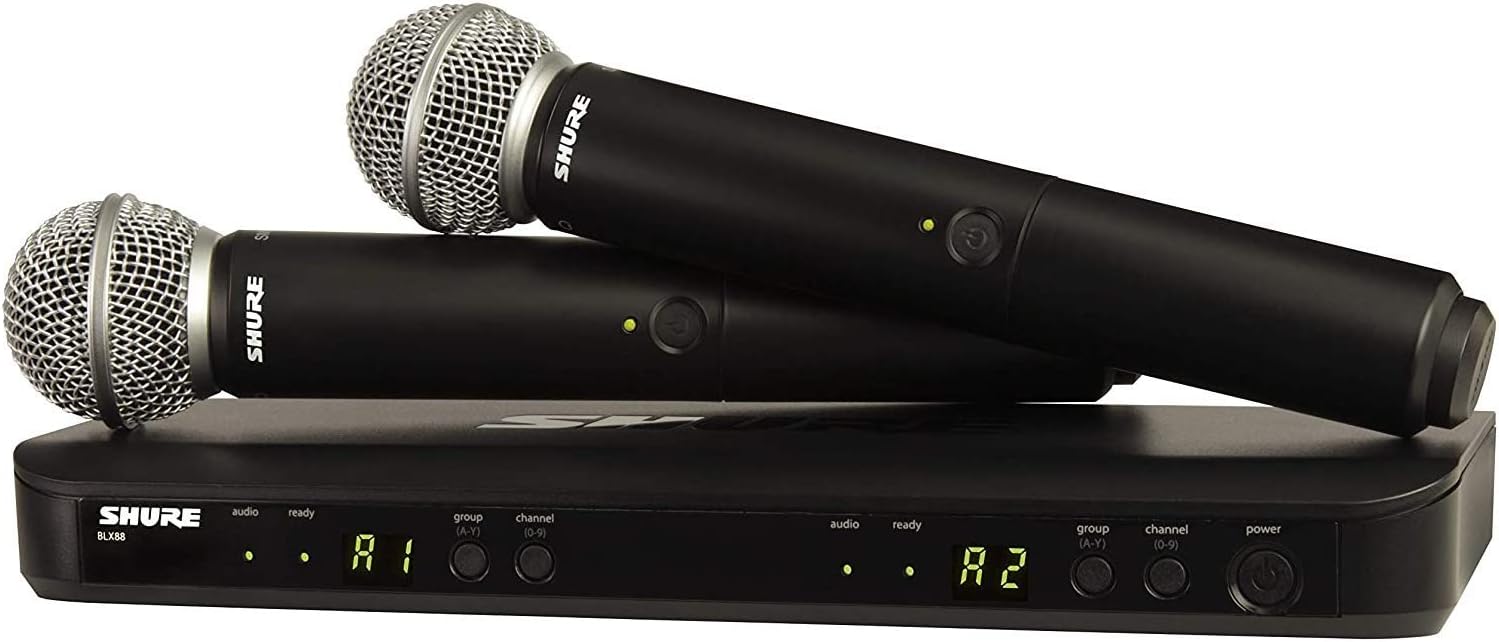
- Wireless microphone two-piece set:Shure BLX288/SM58,$649.00
- A pair of PA speakers:Bose S1 Pro,$599.99×2
- One mixing console:Yamaha MG10XU,$209.99
- Two wires:Livewire Elite QuadThe total price for both is around $100.
Total: $2059 (equipment excluding wires) + $120 (wires) = $2159.
This upgrade enhances comfort (wireless microphone) and full audio sound effects (Bose speakers), effortlessly bridging karaoke, home theater, and high-fidelity audio systems. Personally, I believe that spending just over $2000 on a home karaoke system is sufficient; spending more (such as over $3000) offers minimal improvement in sound quality.
Part 1 | Karaoke System Hardware: Classification and Selection
The song selection system is equivalent to the karaoke machine in a KTV private room. Simply put, its function is to search for and call up song videos, and play them on our video and audio devices. In a home karaoke system, we can use many different methods to achieve song selection.
Section 1: Traditional Karaoke Machines/Single Talk Players (Recommended for beginners)
The karaoke machine is essentially a device that pre-downloads song video files onto its internal hard drive or DVD discs, allowing for searching and calling up songs while singing. Since KTV rooms primarily use this type of equipment, the song selection effect of traditional karaoke machines is the same as that of KTV rooms.
1. Its advantages:
- Songs are played locally, so no internet connection is required.
- Most of the time, it can guarantee high-definition image quality.
2. However, it also has obvious drawbacks:
- First, priceThe desktop Karla OK machines available in the U.S. start at $300 without a touchscreen and $600 with a touchscreen. If you add a pair of unknown brand microphones, the price goes above $800. It's not that this price is unaffordable, but it's not worth it; the value received does not match the cost. Please continue reading;
- Second, qualityThe biggest cost of the karaoke machine is its hard drive, and the most concerning quality issue is also its hard drive. The karaoke machine with a DVD player also has to worry about the optical drive. I bought a karaoke machine in the United States that lasted less than six months and hardly sang a few times before it could no longer read discs; eventually, it wouldn't start at all.
- Thirdly, the connection between sound and image.Many music videos feature landscapes or models that have no relation to the song's content, which is particularly evident in new songs. It is likely that the production companies do not have full copyright, for example, they may have only purchased the rights to use the song but do not own the rights to the MV.
3. Summary:
From a pricing perspective, I do not recommend using a karaoke machine/jukebox in the United States for home karaoke purposes (but it can be used for commercial KTV rooms, as many American dealers offer free after-sales service for systems priced over $3000, which includes repairs and song updates).
Section 2: DIY Your Own Karaoke System (Not recommended for non-DIY enthusiasts; you can skip this section)
In the previous section, it was mentioned that the working principle of commercially available karaoke machines is very simple: first, copy the song videos to the local hard drive or DVD, and then use software to call and select songs. From these two functional points, an (old) computer (either desktop or laptop) can accomplish this, and it can also do much more and better.
1. To create a karaoke system using a computer, the following three steps are required:
Step 1: Download and install the karaoke software:
There are many karaoke software available online, and their functions are basically similar, with most differences lying in the aesthetic appeal of the interface. Among them, Aman GeBa is a truly free KTV karaoke system that I used for a long time, and the official website ishttp://www.amanktv.cn/。
(Originally, there was a lot of content here, but since I don't recommend it for ordinary families, I've deleted it all.)
Step 2: Download the song video:
Similarly, there are many places online to download KTV song videos (in .MKV format). For example, the MV Download Wizard website offers free downloads of MV videos in MKV format, and the website iswww.mvmkv.comMany other websites also offer paid download services.
Step 3, Wireless Song Selection (Optional):
If you want to sit on the sofa and select songs instead of always going back to the computer to operate the software, you need to use the following two methods to achieve wireless control of the computer, thus enabling wireless song selection:
- Wireless keyboard;
- You can install software and applications that allow remote control of your computer from your phone (or tablet) on both your computer and phone. I use TeamViewer.
2. Summary:
Using a computer to create a karaoke system is more than sufficient in terms of performance, and it can also utilize old computers, making it economical. However, since it essentially means starting from scratch to DIY a karaoke system, you need to install karaoke software yourself and search for each song, which requires a significant amount of time and effort. Therefore, it is only suitable for very interested DIY enthusiasts and not for ordinary households as a karaoke system for entertainment purposes.
Section 3: Using a mobile phone to select songs (suitable for people who are proficient in using electronic devices)
This method involves installing a karaoke app on a mobile phone (it can also be a tablet, the method is the same; or a TV box, the method is similar), searching for and calling online song video files while singing karaoke, and then projecting the video and songs onto the TV via screen mirroring. This is a unique way of selecting songs in the era of high-speed internet, and it is currently the method I use for selecting songs.
1. Its advantages:
- Due to the high prevalence of touch screen smartphones, you no longer need to spend extra money on purchasing karaoke equipment, and you have gained significant freedom in the way you select songs.Imagine being able to hold your phone and select songs in any position, anywhere, without having to get up from the sofa and walk to the karaoke machine's screen to choose a song (of course, many karaoke machines now also support song selection via Wi-Fi connection with your phone); when multiple people are singing, you can switch to using any phone for screen sharing, making it extremely flexible to change songs.
- Secondly, it can make full use of the vast amount of free song and video resources online.This is the biggest advantage of using a mobile phone to select songs. One of the karaoke apps I recommend uses its own song library, while the other actually utilizes resources from YouTube. So how many songs are there on YouTube, the largest video site in the United States? In an article titled "YouTube Music vs. Spotify — Which is the better streaming music service? Can the biggest name in streaming video overtake the biggest name in streaming music?" by ARA WAGONER, it is mentioned: "Spotify lists over 30 million songs in its catalog... while YouTube has many, many more songs than that." On YouTube, you can search for almost all song videos: from classic oldies to the latest TikTok hits, from revolutionary red songs to children's songs, from film and television classics to dance hits, there is nothing you can't think of, and nothing you can't find.
- Third, it is easy to operate.If it can be found on a mobile phone, it can be played. Children can also search and play it themselves.
- Fourthly, audio-visual relatedMost music videos are related to the content of the songs. Even if a new song doesn't have an official MV, there will usually be scrolling photos of the singer or related clips made by the producer. It is rare to see a situation where a touching love song is accompanied by unrelated visuals, such as swimsuit models on the beach, similar to a karaoke machine.
- Fifth, extremely fast update speed.More and more artists and production companies are choosing to release their latest songs online; even if there isn't one at the moment, there will be good Samaritans who will bring it in. For example, the TV series "The Untamed" was aired on Tencent Video on June 27, 2019, and just a few days later, on July 8, Tencent officially released the theme song "Unrestrained" [non-MV] OST (sung by Xiao Zhan and Wang Yibo) on YouTube, and then less than a month later, on July 26, they released the official MV of the theme song (Zhou Bichang version). This almost instantaneous update speed is something that traditional karaoke machine manufacturers cannot match at all.
2. There are also a few limitations/disadvantages to using mobile phones for song selection:
- Because accessing online resources requires an internet connection.However, considering that mobile phones and Wi-Fi networks are as standard in American households as water, electricity, and gas, this point cannot actually be considered a disadvantage; it can be seen as a limitation.
- Some song videos are only available in standard definition, not high definition.This situation is particularly common for old songs, as the VCD picture quality was already quite satisfactory many years ago. Therefore, unless it is a remastered version, the old songs by the original artists will typically be in standard definition. This is actually a common issue with karaoke machines and online resources, not unique to mobile song requests.
- Finding a suitable karaoke app is not easy.There are three features that I hope the K song application can achieve: having the original singer, having an MV video, and being able to cast to a big TV. After spending a lot of time painfully sorting through and trying out different options, I found that there are not many applications in the market that can meet all three of these requirements.
3. Summary:
The popularity and convenience of mobile phones, along with the astonishing number and update speed of free online music videos, make them more suitable for home use as a karaoke song selection system compared to traditional jukeboxes. In the following section "Software of the Song Selection System: Mobile Karaoke Applications," I will provide a detailed introduction to the applications needed for mobile song selection.
Now that we have prepared the karaoke system, the next step is to project the MV videos and audio displayed by the mobile karaoke app onto the TV at home. There are two situations as follows:
Scenario 1: If your TV is a smart TV
The so-called smart TV is simply a television that can connect to the internet (most of those produced since 2015 are smart TVs). If your TV is a smart TV, it can connect wirelessly to your phone without the need to purchase any other similar devices like set-top boxes or TV boxes. The method for screen mirroring is also very simple:
1. First, ensure that your mobile phone and TV are using the same Wi-Fi network.
2. Use your phone's "screen mirroring" function to cast your screen to the TV:
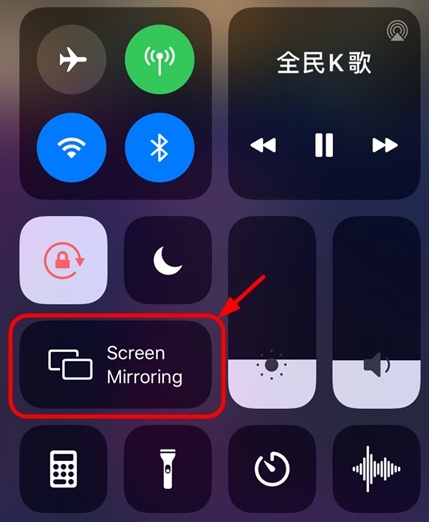
- Apple iPhoneFirst, open the Control Center panel, then select "Screen Mirroring," and click to choose the corresponding TV device name.
![]()
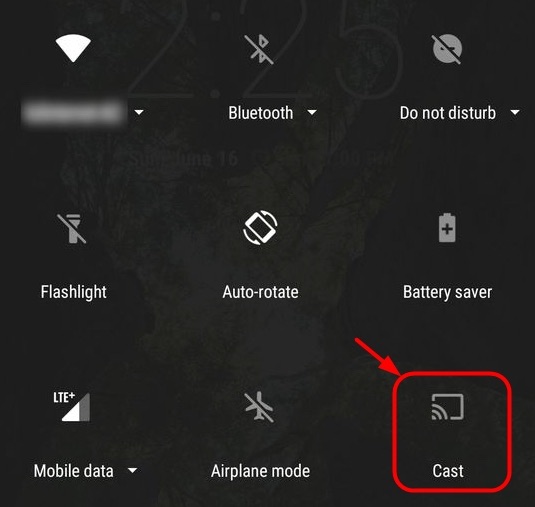
- Android phonesOpen the quick settings panel, then select "Screen Cast" or "Cast," and click to choose the corresponding TV device name.
![]()
-
3. Full-screen playback: Alright, now the MV video of 全民 K 歌 on your phone has been projected onto your smart TV screen, along with the accompaniment and the original singer (if you have turned on the original singer). However, on the TV, it is still in the vertical format like the phone screen, so what should we do?
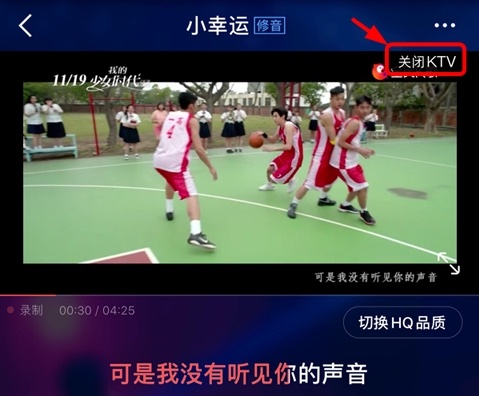
First, click "Close KTV".
![]()
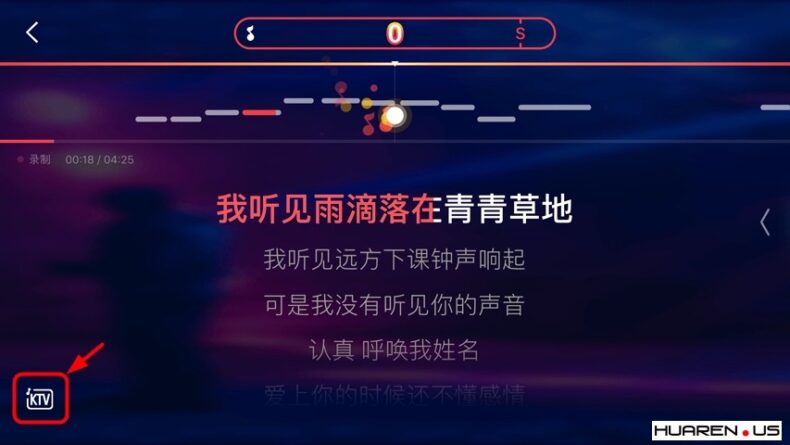
- Then rotate the phone from portrait to landscape (must rotate 90 degrees counterclockwise), at this point the screen will switch to "large lyric mode," and then click the "KTV" icon in the lower left corner (once again, this is based on the old version before the recently released version 7.0, such as version 6.4; version 7.0 has removed this feature, and it is unknown when it will be restored. If you are an iPhone user and have previously installed 全民 K 歌, be sure not to upgrade to version 7.0; Android users who have already upgraded can delete version 7.0 and download version 6.4 to use).
![]() Click "Start KTV" to re-record your song.
Click "Start KTV" to re-record your song.
 Click "Start KTV" to re-record your song.
Scenario 2: If your TV is not a smart TV
Traditional televisions cannot connect to the internet, so if your TV is not a smart TV, you can obtain internet functionality by purchasing a casting device or a TV box, allowing your phone to connect wirelessly to the TV.
There are many types of screen mirroring devices or TV boxes, the two most basic being those produced by Google.ChromecastAnd products made by Apple Inc.Apple TVBecause currently the vast majority of mobile operating systems are products of these two companies, it is only natural to purchase the corresponding TV box based on your phone: Apple phones can directly search for Apple TV without installing any applications, and Android phones can also search for Chromecast without installing any applications. This is the simplest and least error-prone method. Of course, you can also cast content from your iPhone to Chromecast, or cast content from your Android phone to Apple TV, provided that you need to install certain casting applications on your phone and know how to use them.
In addition to the simple Chromecast and the expensive Apple TV, there are also moderately priced yet powerful options like Roku, Amazon Fire Stick, and TV boxes such as Xiaomi Box. They can also connect your phone to the TV and even allow you to install karaoke apps directly on these TV boxes, but you still need to understand their official screen mirroring applications and installation methods. Since the main topic of this article is the karaoke system, I won't elaborate on each one here.
Part Two: Audio Equipment and its Connection and Adjustment Methods
Finally, the long-awaited audio equipment has arrived! The smartphones, TVs, and so on that were mentioned earlier are all common items that most households already have, and they are too familiar to us. However, the audio equipment used in karaoke systems is a brand new field that we are about to explore. Much of the content below will be new knowledge, even for Hi-Fi enthusiasts and home theater lovers.
First, here are the devices you absolutely do not need:
- power amplifier
- passive speaker
- High-fidelity audio
- Home theater equipment
- Professional wire cutting and cabling
We only need three audio devices:
- microphone
- mixing console
- PA system speakers
And the wires with adapters that connect them.
1. Microphone
1-1. Common microphones can be divided into two categories:
There are dynamic microphones and condenser microphones. Karaoke microphones must choose dynamic microphones.
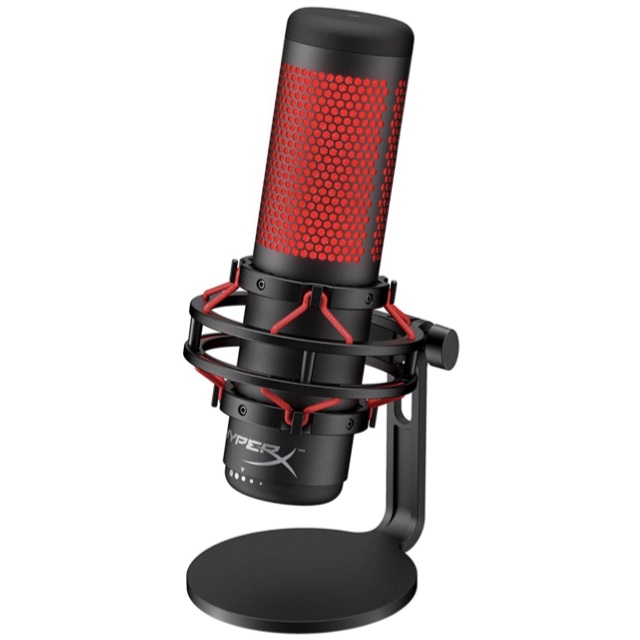
1-2. Why are dynamic microphones suitable for karaoke?
This is because dynamic microphones have two characteristics:
- Dynamic microphones are less sensitive to background noise compared to condenser microphones. Simply put, they can only pick up sounds that are close and relatively loud, which precisely meets the needs of karaoke.When singing, you definitely don't want the voices of your friends around you (ambient noise) or the sound of your own breathing between lyrics (at a low volume) to be picked up by the microphone, right? Moreover, it can also handle sudden increases in volume without producing "clipping" (for example, when you hit high notes).
- The dynamic microphone is simply synonymous with "indestructible" compared to condenser microphones; even if it accidentally falls to the ground, the likelihood of damage is much lower. This is also why the microphones used by lead singers at concerts are all dynamic.
By the way, condenser microphones are generally used for recording in studios because they are more sensitive to sound and can capture the most subtle vocal nuances of a singer. However, the downside is also here: condenser microphones pick up all surrounding sounds, regardless of their size, such as ambient noise and breathing sounds, which need to be removed using post-production audio processing software. Therefore, condenser microphones are not suitable for live performances at concerts. Another issue is that condenser microphones are quite delicate and need to be handled gently, unlike dynamic microphones that can be casually tossed onto a sofa without any problem.
The reason for listing the English names of the two types of microphones above is that they cannot always be accurately distinguished based solely on appearance: dynamic microphones can also come in non-handheld styles, while condenser microphones can also be made in handheld styles. Therefore, whether you are shopping online or selecting in a store, you must confirm that it is a dynamic (Dynamic) microphone before making a purchase.
1-3. Several common questions during the selection process:
Question 1: Should I buy a wired or wireless microphone?
A: Wired microphones are inexpensive and easy to install, but they have the inconvenience of cables on the ground; wireless microphones are twice the price and require more steps for installation and debugging, but they are more convenient to use because there are no cables on the ground.
Question 2: Should I buy one microphone or two microphones?
A: If you want to sing duets but don't want to keep switching microphones, you'll need to buy two microphones. My suggestion is that two microphones are sufficient for general home use.
Question 3: What should I pay attention to?
Answer: Whether it's a wired microphone or a wireless microphone, you must choose a microphone that has a sound switch. (If you have already purchased a microphone without a switch, you will need to buy a microphone cable with a switch to compensate.)
- wired microphoneThe length of the cable to be purchased should be considered based on the distance between the mixing console and the singing position.
- wireless microphoneWhen making a purchase, you should decide whether you want a single microphone system or a dual microphone system (Dual Vocal, also known as Dual Channel). A single microphone system cannot be upgraded to a dual microphone system unless you buy another single microphone system.
Question 4: What would you recommend?
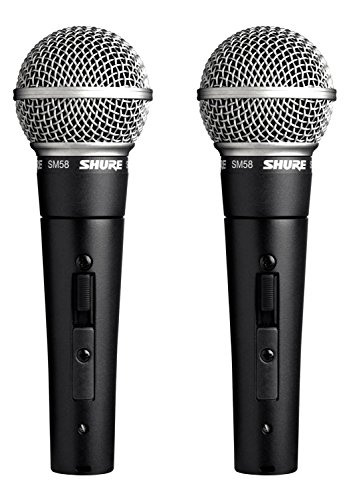
- wired microphoneI bought it myself.Shure SM58S Wired Microphone, with a microphone switch. This is a very common microphone used in concerts and karaoke competitions, which can be said to be well-tested and reasonably priced. I bought one from B&H a long time ago, and after trying it out, I found that the issue of the cable dragging on the ground was not as significant as I had imagined, so I bought a second one.I recommend buying from B&H.because they offer a "microphone + 20-foot cable + microphone stand" three-piece set, which is only $11 more than the standalone microphone at Guitar Center, but includes the stand and cable, so there's no need to buy a microphone cable separately.
![Shure SM58S Professional Vocal Microphone w/On/Off Switch (2 Pack)]()
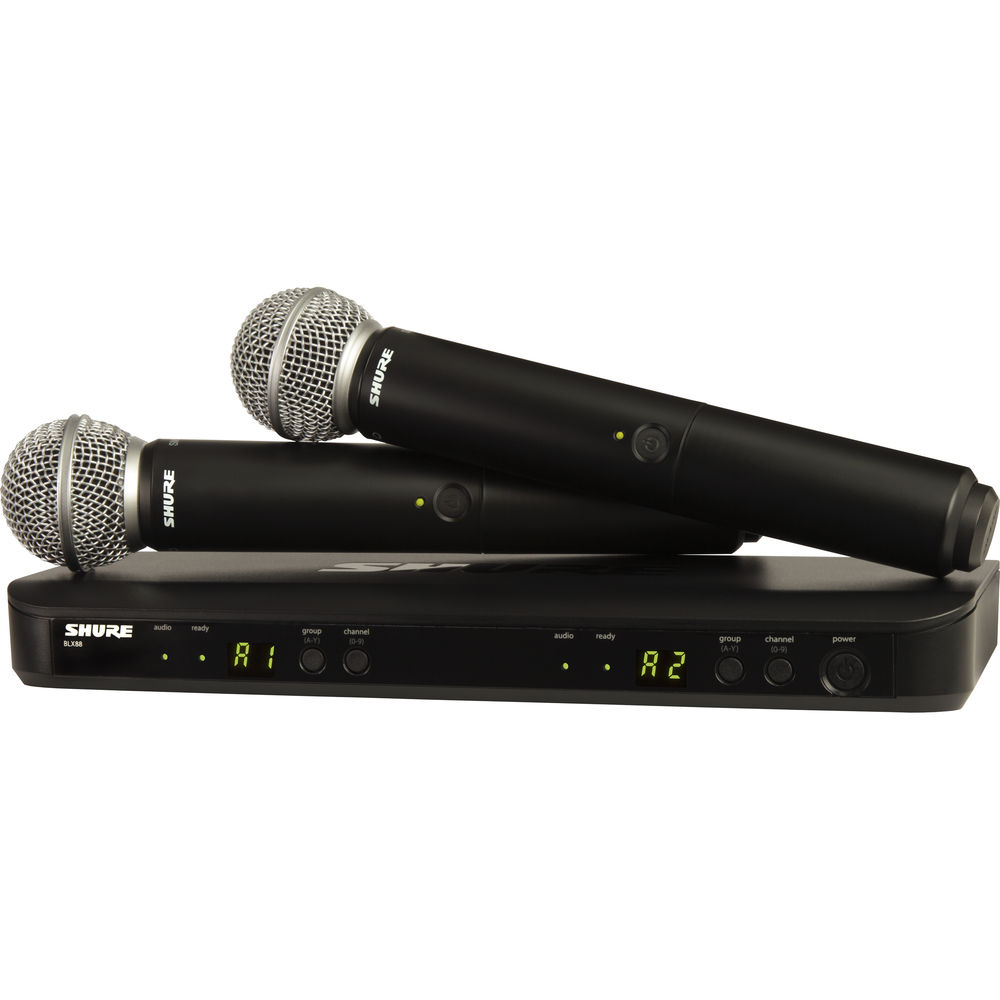
- wireless microphoneIf I were to upgrade my wireless microphone in the future, I would recommend purchasing [this product/service].Shure BLX288/SM58 Dual-Channel Wireless System(Schure BLX288/ SM58 wireless dual microphone). To explain: the SM58 microphone has significantly better sound quality than the PG58, even though they are both wireless dual microphone systems.Shure BLX288/SM58Price comparisonShure BLX288/PG58I think it's worth the extra $100.
![]()
2. Powered PA Speaker
Ah! We've reached the step of the speakers. There are so many types of speakers that it's dazzling, and the choices are overwhelming, yet speakers are the most expensive part of the audio system, making it necessary to be cautious.
2-1. Correctly select the speakers for karaoke:
When it comes to what kind of speaker to use for karaoke, you may have many questions you want answered, such as "Can I use a home theater system for karaoke?" "Can I use a Hi-Fi sound system for karaoke?" "Can I use desktop speakers for karaoke?" My answer is: all of them are fine. Not only can all the speakers mentioned above be used for karaoke, but I have also tried singing with the built-in speakers of a laptop and the speakers of a TV. However, shouldn't the real question be: "What kind of speaker should I use for karaoke to achieve an effect similar to that of a KTV private room?"
With this question in mind, I visited a local family-owned audio equipment store that has been in operation for three generations. This 70-year-old shop is not large but has been featured multiple times in the music section of the local newspaper. The old owner’s response to my question was:
First, speakers can be simply divided into two categories based on their intended use: home Hi-Fi speakers and professional PA speakers (Public Address Speaker, abbreviated as PA Speaker). Hi-Fi speakers are primarily designed to reproduce studio sound, while PA speakers are mainly designed to produce live sound.
Here’s a note: There is very little introduction to PA speakers in the domestic market (compared to home high-fidelity speakers), and there isn't even a specific name for them. Sometimes they are referred to as professional speakers, and other times as stage speakers, so naturally, people have limited understanding of them. However, for professionals in foreign audio equipment stores, it is quite natural to prioritize PA speakers for karaoke systems, as PA speakers are specifically designed for live speeches or performances.
Secondly, traditional Hi-Fi speakers mostly belong to passive speakers (also known as passive speakers, which do not require a power source) and require a separate amplifier to use; while more than three-quarters of PA speakers belong to active speakers (also known as active speakers, which require a power source), as they have built-in amplifier components, so there is no need to purchase a compatible amplifier separately. That's great, it saves one more hassle!
As stated on Yamaha's official website in the article "What are power amplifiers?", "Since the built-in power amplifier is designed specifically for the speaker, the speaker and power amplifier combination feature superior compatibility, allowing the speaker to perform to the fullest." Therefore, this is not just about saving time and money, but also about achieving better sound quality.
Third, although Hi-Fi audio systems/home theaters "can" be used for karaoke, due to the uncertainty of live vocals, it is best to use PA speakers that can handle higher power instead of Hi-Fi speakers that can handle much less power. Under the impact of sudden large signals, the likelihood of Hi-Fi speakers experiencing "burnt speakers" is much greater than that of PA speakers.
The conclusion of the old shop owner is: I need to buy a powered PA speaker, and I only need to purchase a mixer, without needing to buy an amplifier. Since their store specializes in home Hi-Fi audio systems, he suggested that I check out Guitar Center.
I have to commend the professionalism and integrity of this family-owned store. You see, I came here with the intention of purchasing all the necessary equipment, and I discussed for a long time with the old shopkeeper about "how to use Hi-Fi audio to sing karaoke." As the shopkeeper himself said, "Singing karaoke with Hi-Fi audio may not be ideal, but it's not impossible." However, he still referred this business to other merchants who were more suitable for the customers' needs, precisely because there is a possibility that the high notes sung by karaoke singers could damage the Hi-Fi speakers, which would harm the customers' interests.
2-2. Summary:
- If you already own a Hi-Fi speaker/home theaterYou can use your existing equipment to sing karaoke, but you must pay attention to the volume to avoid the risk of burning out your speakers.
- If it's a newly installed systemWhether it's a Hi-Fi audio store or professionals from a performance equipment store, active PA speakers are recommended for karaoke because they are specifically designed for stage performances, concerts, and public speaking events. They can handle extremely high volumes, making them the ideal choice for karaoke sound equipment.
- The active PA speaker itself already has a complete driver circuit, crossover, and amplifier, so it can ensure stable sound quality without the need to connect an external amplifier, and it will not be affected by the wiring.
- Regarding the question of whether to buy one speaker or a pair of speakersI bought a pair of speakers to achieve a stereo effect.
- Choosing a speaker based on personal experience is very important. If conditions permit, it's best to visit an audio equipment store to compare and listen; if conditions do not allow, you can search for videos on YouTube to listen to different speakers.
- Karaoke systems can also be used for other purposesFor this system using the Alto TS312 active PA speakers, my personal feeling is that the sound effects for movies are very good, while the playback of high-fidelity music should be more refined with the JBL EON 612.
Okay, let's get back to the main topic. Now let's take a look at the mixing console that connects all the different devices together.
3. Mixer
With a television, a microphone, and speakers, there needs to be a machine that can connect them all together, and that machine is the mixer. The function of the mixer is to receive sounds from different sources (such as microphones, electronic keyboards, and MV videos), mix, amplify, and modify them internally, and then output them uniformly to the speakers. The simplest mixer simply converts multiple audio sources into a single output to the speakers, while more complex mixers have additional features such as sound effects and computer recording.
When I was selecting a mixer at Guitar Center, the staff immediately recommended the Yamaha MG10XU. The reason is:
- Yamaha is a brand synonymous with high-quality speaker equipment, so there's no need to worry about sound quality or effects.
- Japan is the country where the world's first karaoke machine was born, and since 1971, the trend of singing karaoke has remained popular. Yamaha, a Japanese company, has thoughtfully preset karaoke sound effects ("14. KARAOKE") in this mixing console, allowing for one-click operation to meet the basic requirements for karaoke, which is also why I like it the most. In addition to the karaoke sound effects, it also has a total of 24 digital voice effects preset, perfect for some fun during boring times.
- This is a pure mixing console without an amplifier, which protects PA speakers. Previously, I used a "full-featured performance sound effect processor" customized by a domestic manufacturer, which had a built-in amplifier and could connect to passive speakers. However, the staff at Guitar Center said it is more likely to damage PA speakers that already have a built-in amplifier.
- This mixer has a USB port.You can directly output your singing to the computer for recording, so you can do post-processing. Isn't it professional! The key point is that this recording has almost no background noise!
- This mixing console has four microphone/instrument inputs (for example, two microphones, a guitar, and a keyboard can be connected simultaneously).I think it can meet the needs of the vast majority of people. Even if a child is interested in forming a small band in the future, it's fine.
In addition, Yamaha also offers a lower-spec version with effects, the Yamaha MG06X 6-Channel Mixer, priced at nearly half, with some functionality reduced: it has only two microphone/instrument inputs, no USB port for computer recording, and features 6 effects but lacks a dedicated "KARAOKE" effect for karaoke settings, so adjustments need to be made manually. However, we only need it to have basic mixing, amplification, and enhancement functions, so it can work for us. It is not recommended to purchase another Yamaha MG10 version, as it lacks the suffix "XU" found in the Yamaha MG10XU version, where one letter refers to effects (Effect, X) and the other refers to the USB port (for connecting to a computer, U), which reduces playability and expandability, while the price does not decrease significantly.
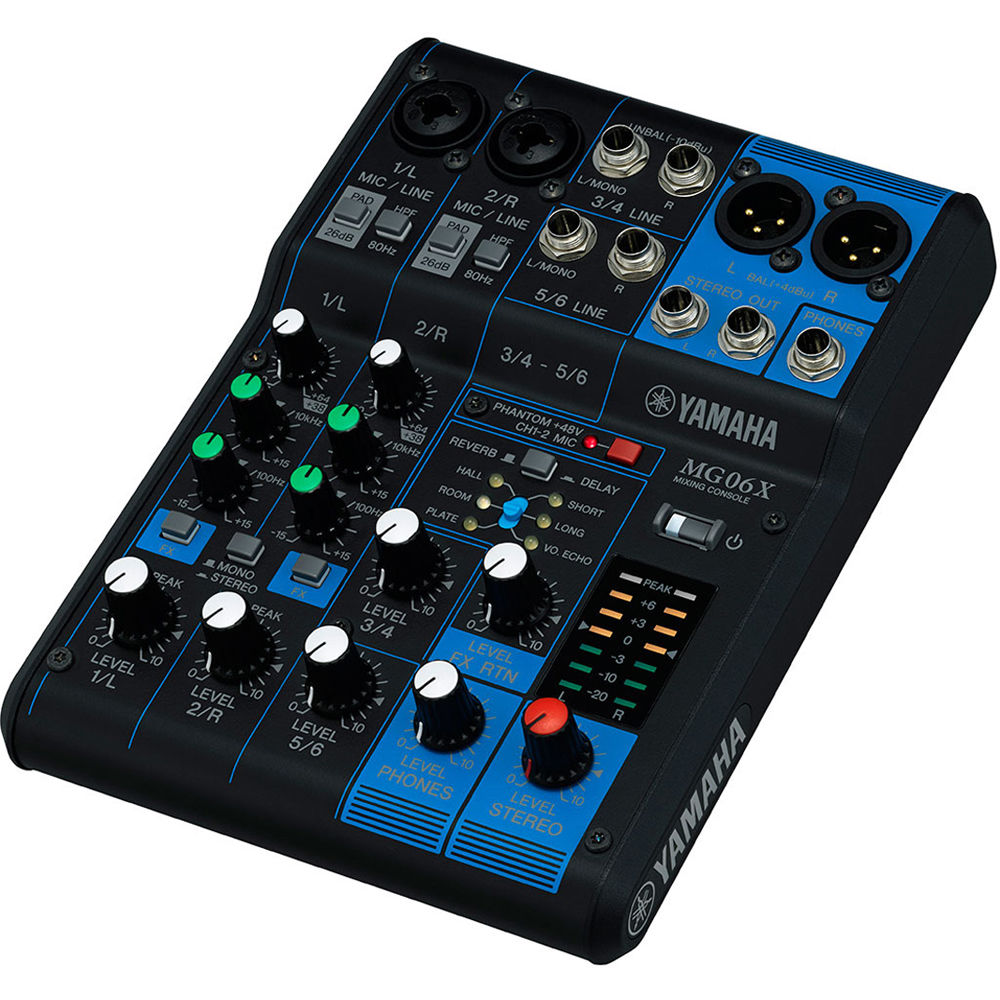
After getting the Yamaha MG10XU, you are likely to be intimidated by the densely packed knobs and buttons on the panel, just like I was at first. In fact, because it has preset karaoke effects, its operation is almost foolproof. In the section below where I explain how to connect various devices, I will include a setup diagram for the mixer, and by following my settings, you can basically achieve a good karaoke effect.
If you have read the detailed introduction above and are still hesitant to take action, then consider buying a ready-made karaoke machine. Although the quality may not be as good, it is simple and inexpensive—below are a few models with good reviews.
-3.png?w=1200&h=1200) |
Blume 6-in-1 Karaoke Machine: $999 at Blume
|
-3.png?w=1200&h=1200) |
Lanmi Karaoke Pro 19' 5-in-1 Amplifier Karaoke Machine$699 at BlumeLanmi
|
.png?w=1672&h=941)